

AI can make automation far more flexible, but only when it is implemented with control, clarity, and measurable outcomes.
In Make.com, AI works best as a step inside a bigger process, not as the process itself. For B2B organisations, the goal is simple: reduce manual work without introducing new risk. That means using AI where it excels, such as interpretation and transformation of messy inputs, while keeping deterministic automation in charge of routing, validation, updates, and logging.
This page explains practical ways to use AI in Make scenarios, from Make’s built-in AI modules to third-party LLM integrations and governed agent-style workflows.
New to Make.com? Read more about what Make.com is and how organizations use it to orchestrate workflows and automation across systems.
AI is valuable when inputs are unstructured, inconsistent, or too time-consuming to handle manually. Used properly, it enables:
The objective is not experimentation. It is controlled productivity gains inside real processes.
Curious to see more Make.com benefits. Explore how Make.com automates work for B2B teams without chaos.

The most accessible way to introduce AI in Make is through the standard Make AI module, especially the Ask an Assistant action.
Here, you stay entirely within Make. You provide structured context and instructions, and the assistant returns a response that the scenario can act on.
Typical flow:
Where it works well:
Key principle: the assistant proposes. The scenario validates and decides.
This keeps AI useful without making it authoritative.
Beyond Ask an Assistant, Make offers dedicated AI actions for common tasks such as:
These actions are ideal when you want structured outputs without designing full prompts.
Examples inside a scenario:
Key principle: the AI handles interpretation. Make enforces structure.
For more flexibility or advanced use cases, Make supports native integrations with third-party AI providers such as OpenAI and others.
This gives you:
In this setup, Make still orchestrates the flow, but you leverage the provider’s native module rather than generic HTTP.
Where this works well:
As with all AI steps, treat outputs as suggested data. Validate before committing to core systems.
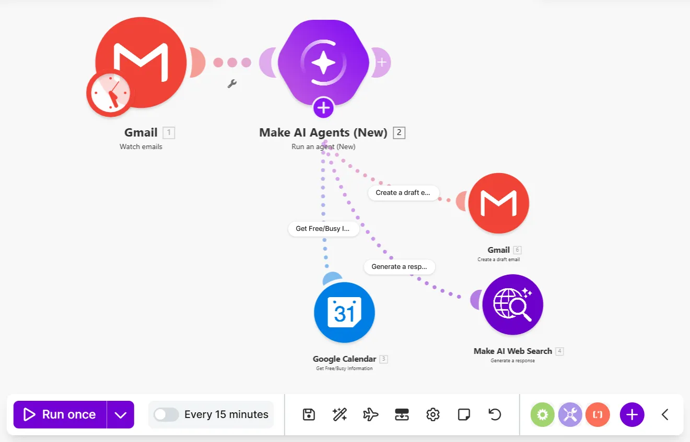
“Agents” can mean many things. In B2B operations, the most practical version is a guided workflow where an AI step can choose from a limited set of pre-approved actions, and Make enforces boundaries.
A practical agent workflow looks like this:
Where this works well:
Key principle: The objective is not autonomy. It is flexibility with governance.
If you want AI steps to hold up in production, design for repeatability and controlled failure.
AI becomes dependable when embedded into disciplined scenario design.
Marketing Operations
Sales Operations and RevOps
Service and Customer Operations
The combination of orchestration, governance, and AI-driven workflows in these use cases is exactly where Make.com automation becomes most valuable. Learn more about our Make.com automation approach.
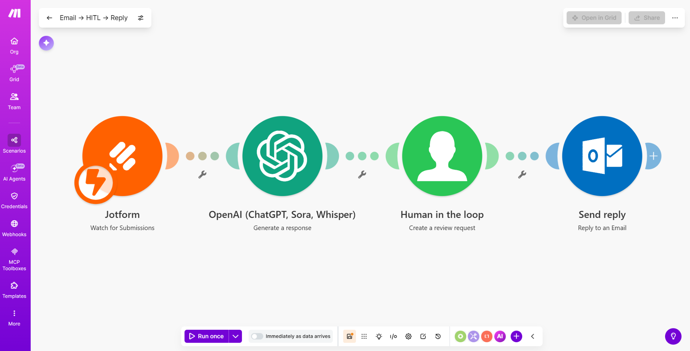
At Chapman Bright, we treat AI as an accelerator, not a decision-maker.
In B2B operations, a single incorrect update can affect lifecycle stages, reporting, and customer experience. That is why human-in-the-loop is not optional.
What this looks like inside Make:
Human-in-the-loop is not a compromise. It is how AI automation becomes dependable at scale.


I’m the author of Marketing Automation Untangled and founder of Chapman Bright. I regularly speak about how automation, AI, and agents are reshaping the future of B2B marketing and sales operations. My passion lies in helping organizations rethink how work gets done. Not by replacing people, but by enabling them to focus on higher-impact work while automation handles repetitive processes in the background.
Together, we can explore practical opportunities to improve productivity, reduce operational friction, connect systems, and create scalable workflows that support smarter growth.
And outside the world of MarTech? I’m a father of two, deejay, and passionate about gadgets, travel, grilling, fine dining, wine, and rum.
Do we need AI agents to get value from AI in Make?
Not necessarily. Most value comes from extraction, classification, and summarisation within governed scenarios. Agent workflows are useful when the next action varies and boundaries are enforced.
How do we prevent AI from writing bad data into CRM or Marketo?
Use structured outputs, field validation, confidence thresholds, and approval steps for high-impact updates.
Can AI be used in regulated or privacy-sensitive environments?
Often yes, depending on what data is sent and how it is handled. Apply data minimisation, masking, strong logging, and clear write-back rules.
What is the best way to call an LLM from Make?
For many use cases, Make’s built-in AI modules are sufficient and easier to maintain. Native third-party modules provide additional flexibility. HTTP calls offer maximum control when needed.
How do we keep prompts maintainable?
Treat prompts like code. Version them, document expected outputs, test changes, and deploy carefully.
Will this replace our ops team’s judgement?
No. The strongest approach is structured human-in-the-loop automation. AI accelerates. Your process decides.